3.3. Surface installation with wall bracket
Note
All measurements in millimeters.
The terminal can be surface-mounted onto a flat surface such as a wall or door frame. A metal wall bracket and mounting hardware (two screws and wall plugs) are included with each terminal. The type of mounting hardware must be selected depending on the wall material.
Complete the following steps:
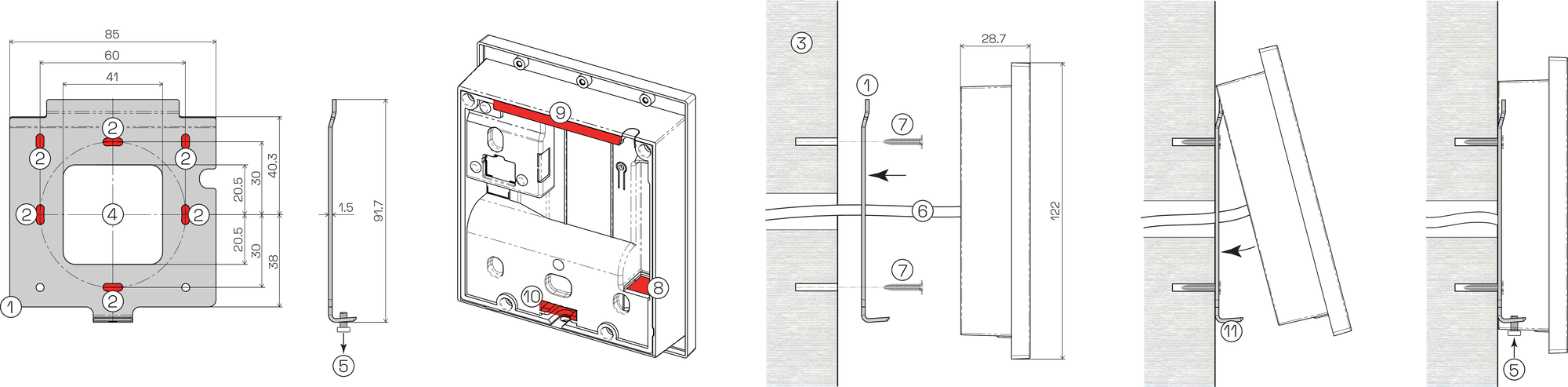
Wall bracket
Mounting hole
Wall
Opening for electrical cabling
Fixing screw
Electrical cabling
Mounting screw
RJ45 socket (Ethernet)
Upper mounting part
Lower mounting part
Lower bracket part
Use the wall bracket (1) to mark out and drill two mounting holes (2) in the desired location on the wall (3).
Note
The recommended mounting height is 1.3 m to the middle of the device.
The wall bracket is delivered with the teminal fixing screw (5) attached. Unscrew and remove the fixing screw from the wall bracket and retain for later.
Feed the electrical cabling (6) through the opening (4) in the wall bracket.
Attach the wall bracket to the wall using two screws (7). Ensure that the wall bracket is level and securely attached to the wall.
Note
Use the correct type of screws and wall plugs according to the wall material. Do not use countersunk screws.
Complete the required electrical connections (see Electrical connections for instructions). Plug the Ethernet cable into the RJ45 socket (8) on the rear side of the terminal and connect any other electrical cabling if required.
Hook the upper mounting part (9) of the terminal onto the top of the wall bracket then carefully swing the terminal forward onto the wall bracket. Ensure that the lower bracket part (11) aligns with the lower mounting part (10) and that the cabling is not damaged during this process.
To secure the terminal onto the wall bracket, tighten the fixing screw (5) from below.