4.4. USB connection (GT7.0510)
The GT7.0510 is equipped with a USB-C port on the rear side of the terminal. After connecting a USB cable to this port and connecting the other end to a computer, the GT7.0510 can operate as a USB Human Interface Device (HID) to read and write data carriers of all types.
A USB-C to USB-C cable and a USB-C to USB-A adapter are delivered with the GT7.0510 for this purpose. Connect the USB cable to the GT7.0510 as follows.
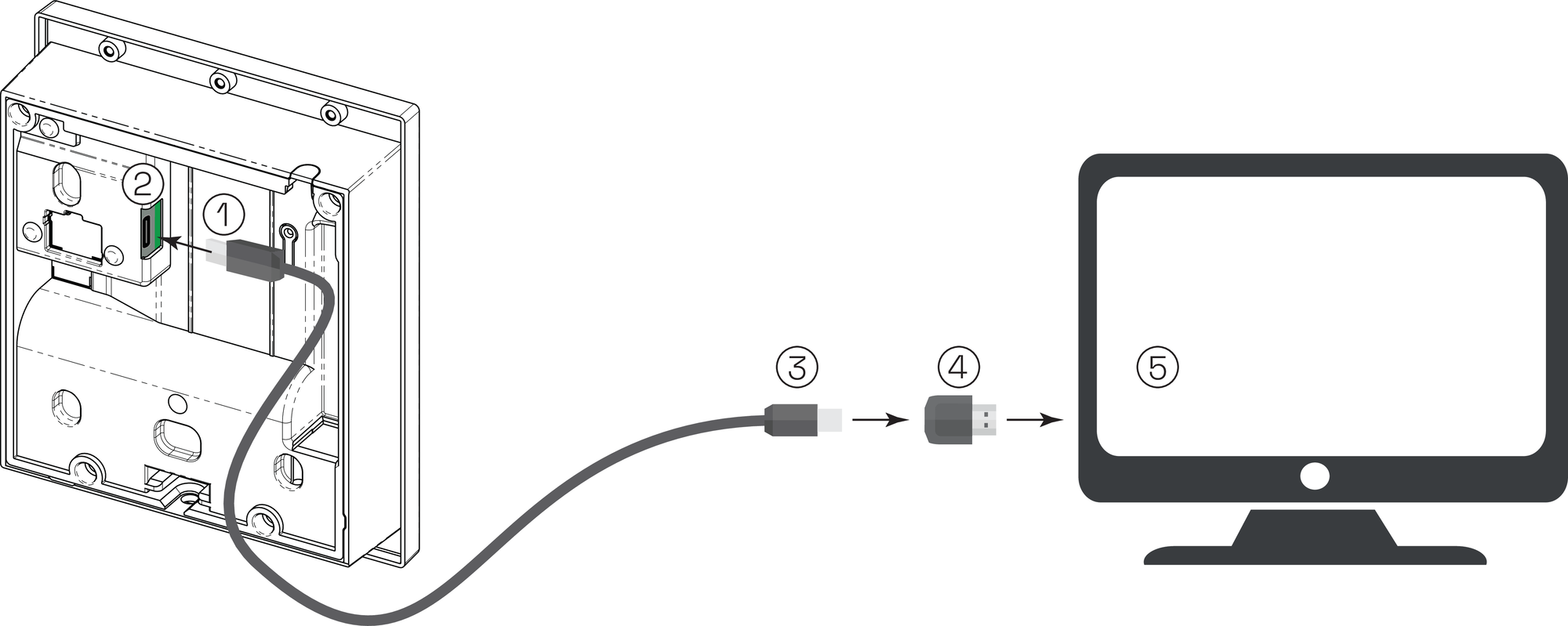
USB-C cable (terminal end)
USB port
USB-C cable (computer end)
USB adapter
Computer
Connect the USB-C cable (1) to the USB port (2) on the rear side of the terminal.
If your computer only has a USB-A connection, connect the other end of the USB-C cable (3) to the USB adapter.
Connect the other end of the USB-C cable (3), or the USB adapter (4), to a spare USB port on your computer (5).
To configure the GT7.0510 as a read/write device, log in to the web interface via a web browser. Refer to Configuration via web interface. The configuration can also be completed in G7 Connect. Refer to the G7 Connect manual for instructions.