5.3.3. Device configuration
The following settings can be configured for the GT7 Lite via the configuration menu. Depending on the model, some of the settings shown here may not be available for your terminal.
To enable a setting, press the box so that a tick is displayed.
To define a setting that has numbers (e.g., the IP address), press the wrench icon.
Once you have defined the settings on a page, press the disc icon to save the settings.
LAN settings
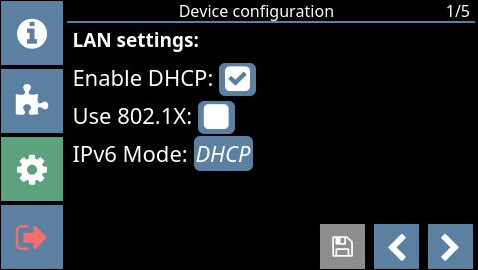 |
Enable DHCP: When this option is enabled, the network router will assign a dynamic IP address to the GT7 Lite. When not enabled, the LAN static IP settings (page 2) are used to determine LAN communication.
Use 802.1X: When this option is enabled, the GT7 Lite will use the 802.1x protocol for identification.
LAN static IP settings
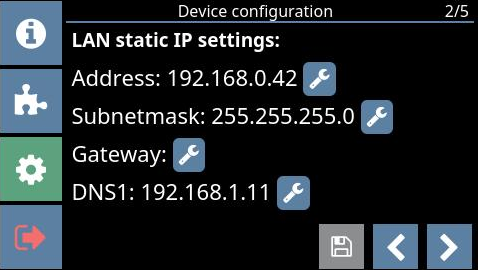 |
Address: The static IP address of the GT7 Lite for LAN communication.
Subnet mask: The static subnet mask of the GT7 Lite for LAN communication.
Gateway: The static gateway address of the GT7 Lite for LAN communication.
DNS1: The address of the primary DNS server for LAN communication.
Time settings
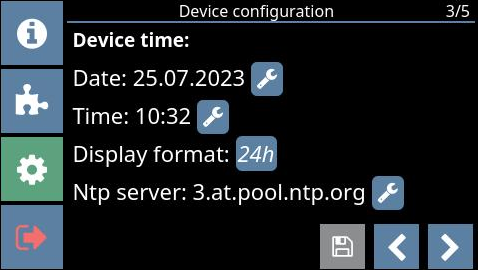 |
Date / Time: The date and time can be manually set here.
Display format: Select between 12h or 24h time format or select None to not display the time.
NTP server: The location of the NTP server from which the time is taken automatically. The default server is displayed. To change this address, use the web interface, as only numbers can be entered in the configuration menu on the GT7 Lite.