4.3. Input and output connections
Notice
Observe the permitted voltage and power values of the relay and optocoupler (see Technical data).
External components, e.g., turnstiles and doors, can be controlled by the GT7 Lite via the relay output and status information can be acquired via the optocoupler input.
After connection, the desired function for the relay and optocoupler must be configured in the configuration settings of the G7 app that is operating on the terminal. These settings are not available with every app as not all apps require this functionality.
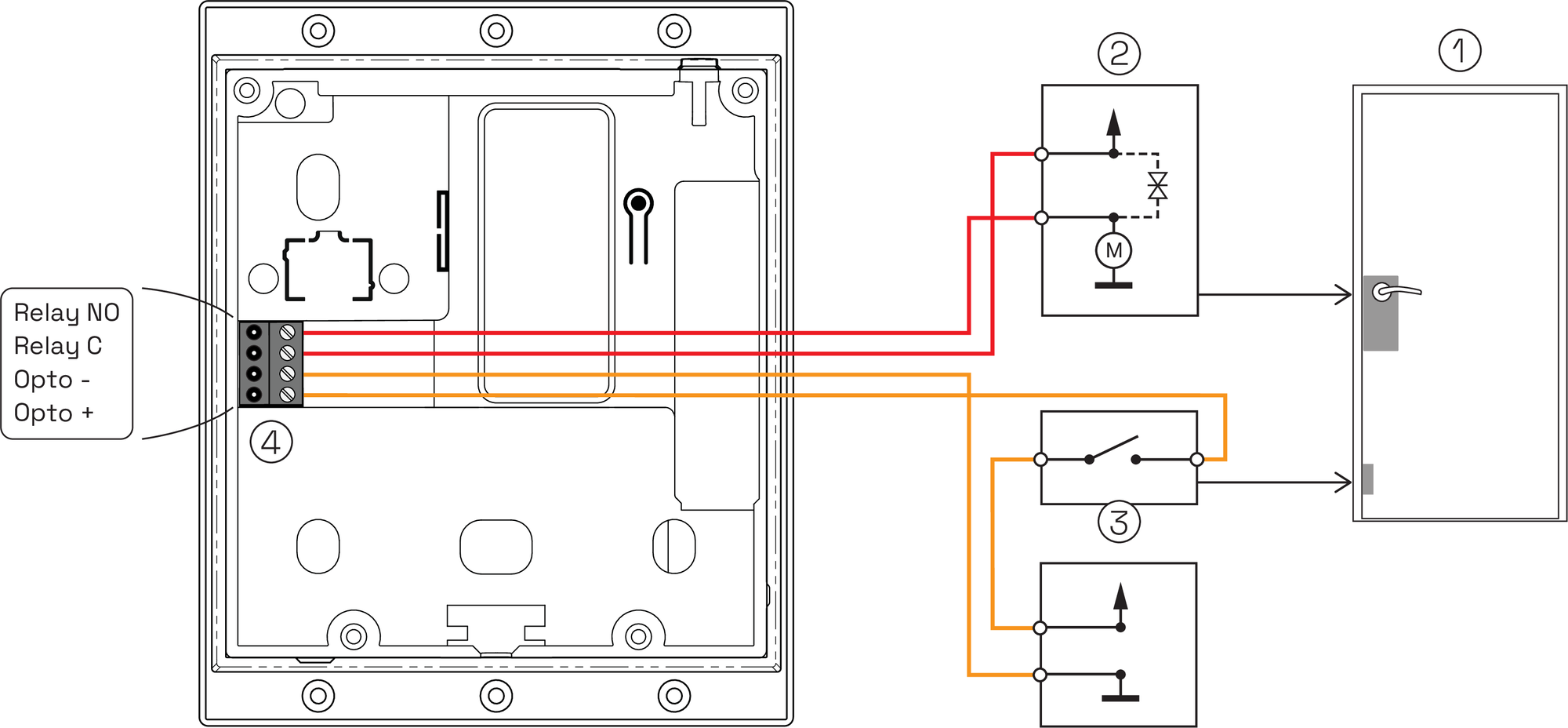
1 ... Door
2 ... Door opener
3 ... Door feedback contact
4 ... Input/output connector
4.3.1. Relay connection
All terminals have one relay output (Relay) that can be used to output digital signals to control external components such as door openers. The reader’s relay can be activated independently. Connected devices must comply with the applicable electrical safety standard (IEC 60950-1 or 62368-1). When connecting inductive loads (e.g., door openers), a suitable free-wheeling diode must be used.
The desired function, such as unlock door, deny access, or block external device, must be selected and the activation time of the relay set in the App configuration settings. The activated app (e.g., Access App) must provide this option in order to use the relays.
4.3.2. Optocoupler connection
The optocoupler input (Opto) is used for feedback, e.g., status acquisition from the connected door. Connected devices must comply with the applicable electrical safety standard (IEC 60950-1 or 62368-1).