3.5. Semi-flush installation
Note
All measurements in millimeters.
A semi-flush installation allows the terminal to be installed on a flat surface, e.g., into a desk or countertop or metal turnstile. Four clips are attached to the terminal housing that hold the terminal securely in the cutout. The mounting clips are available to order from Gantner as an accessory (Part No. 1115190). No other installation accessories apart from the clips are required for this method.
Complete the following steps:
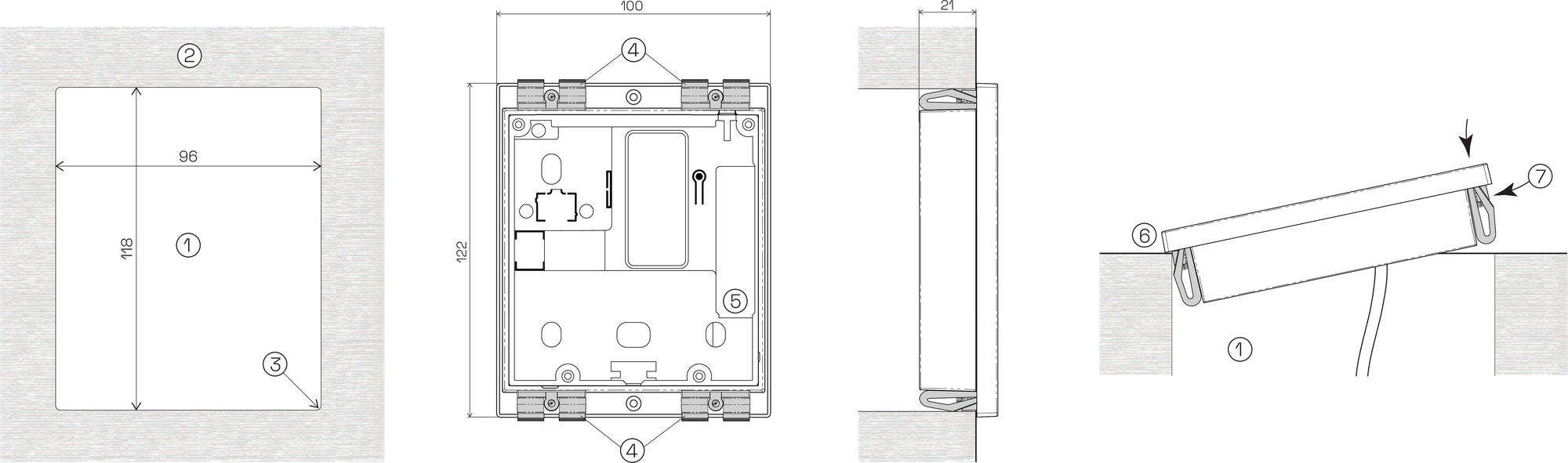
Cutout (W: 96 mm, H: 118 mm)
Installation surface
Corner radius = max. 5 mm
Mounting clips
RJ45 socket (Ethernet)
Cut out and remove a section (1) of the installation surface (2) according to the measurements above.
Note
A corner radius of max. 5 mm is possible for the edges of the cutout.
Attach the four mounting clips (4) to the holes in each corner of the terminal housing using the supplied screws.
Complete the required electrical connections (see Electrical connections for instructions). Plug the Ethernet cable into the RJ45 socket (4) on the rear side of the terminal and connect any other electrical cabling if required.
Insert one side of the terminal (6) into the cutout (1). While pushing the clips in on the other side of the terminal (7), insert the terminal into the cutout.