3.2. Installation process
Note
Pay attention to the following points during installation:
Recommended mounting height: 1.3 m to the middle of the device display.
If installing the terminal outdoors, the electrical installation and any empty conduits must be sealed airtight to prevent condensation in the terminal. The conduits can be sealed using PE round sealing cord, which is available to order from Gantner (Part No. 1114337).
To install the GT7.3x27 onto a turnstile, flat surface or onto the wall, a tubular holder of Ø 30 mm is used (see The GAT Holder 6xx0 Range). The connection cables run through the tubular holder to meet the electrical connections inside the terminal housing.
During the project planning phase, ensure that the necessary cabling infrastructure is completed as required, e.g., a conduit under the finished floor if using the GAT Holder 6020. The cable installation process is as follows:
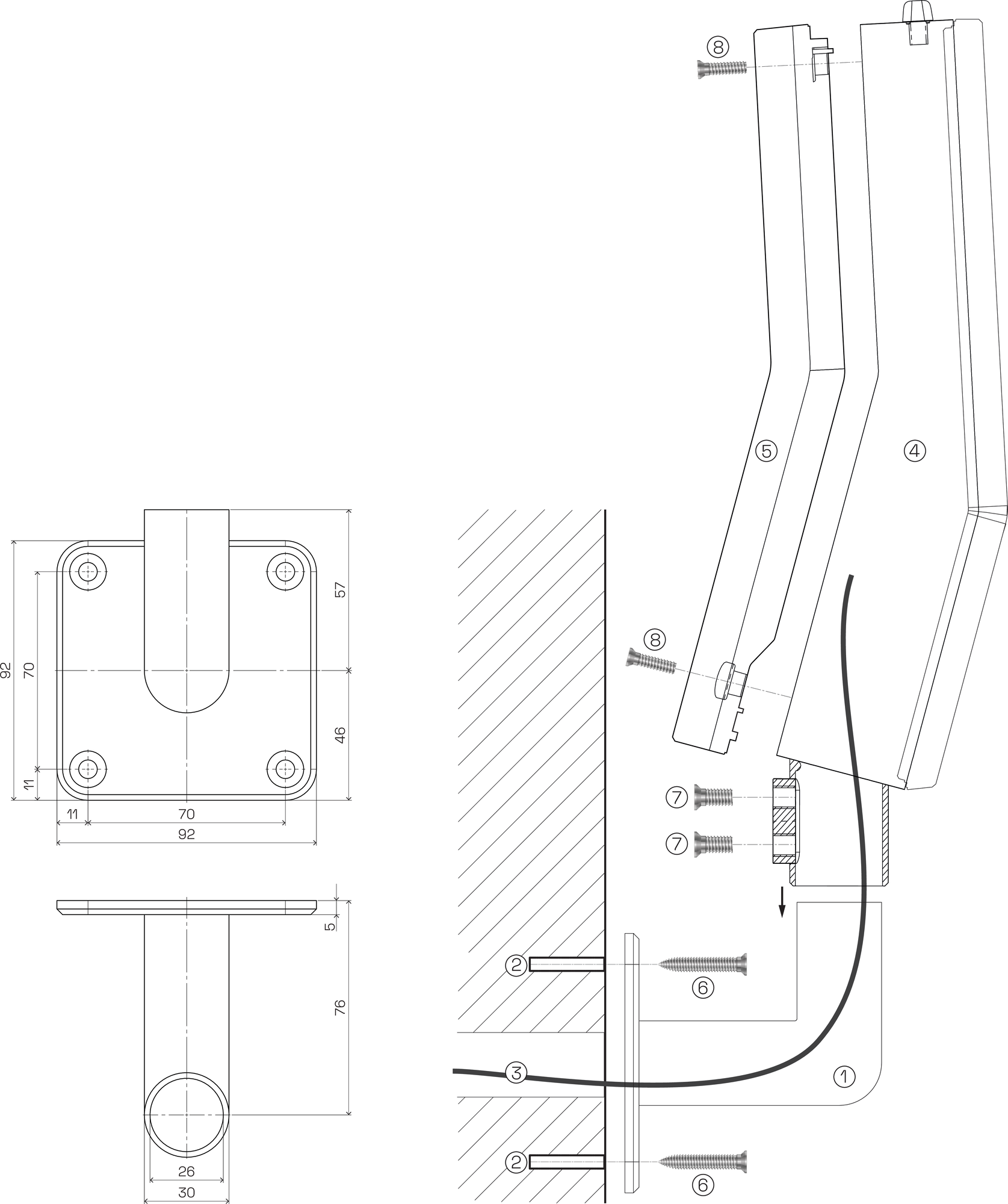
GAT Holder 6120
Drill holes for holder installation
Connection cables
Housing middle part
Housing rear part
Holder wall mounting screws
GT7.3x27 tube fixing screws
Rear part screws
Note
The following instructions are applicable for the GAT Holder 6120. However, the installation process is similar for the other holders in the GAT Holder 6xx0 range (see The GAT Holder 6xx0 Range).
For detailed instructions on installing the other holders in the GAT Holder 6xx0 range, refer to the document VB_GT7m-2x00--DE+EN.
The installation process is as follows:
Drill four mounting holes (2) into the wall for the GAT Holder 6120 (1). The screws and wall plugs necessary for a concrete or masonry wall are included with the GAT Holder 6120.
Feed the connection cables (3) through the tube of the GAT Holder 6120 (1).
Attach the GAT Holder 6120 (1) to the wall using the four mounting screws (6).
Unscrew the four screws (8) and remove the housing rear part. See Opening / closing the housing.
Feed the connection cables (3) through the housing middle part (4) and mount the middle part onto the GAT Holder 6120 (1).
Complete the electrical connections. See Electrical connections.
Use cable ties to secure the cables to the holes provided in the housing middle part.
Reattach the housing rear part (5) to the middle part (4). See Opening / closing the housing.
If desired, rotate the terminal to the desired position on the GAT Holder 6120.
Tighten the two tube fixing screws (7) firmly so that the terminal is secure and cannot be removed from the GAT Holder 6120.