5.4.6. WLAN
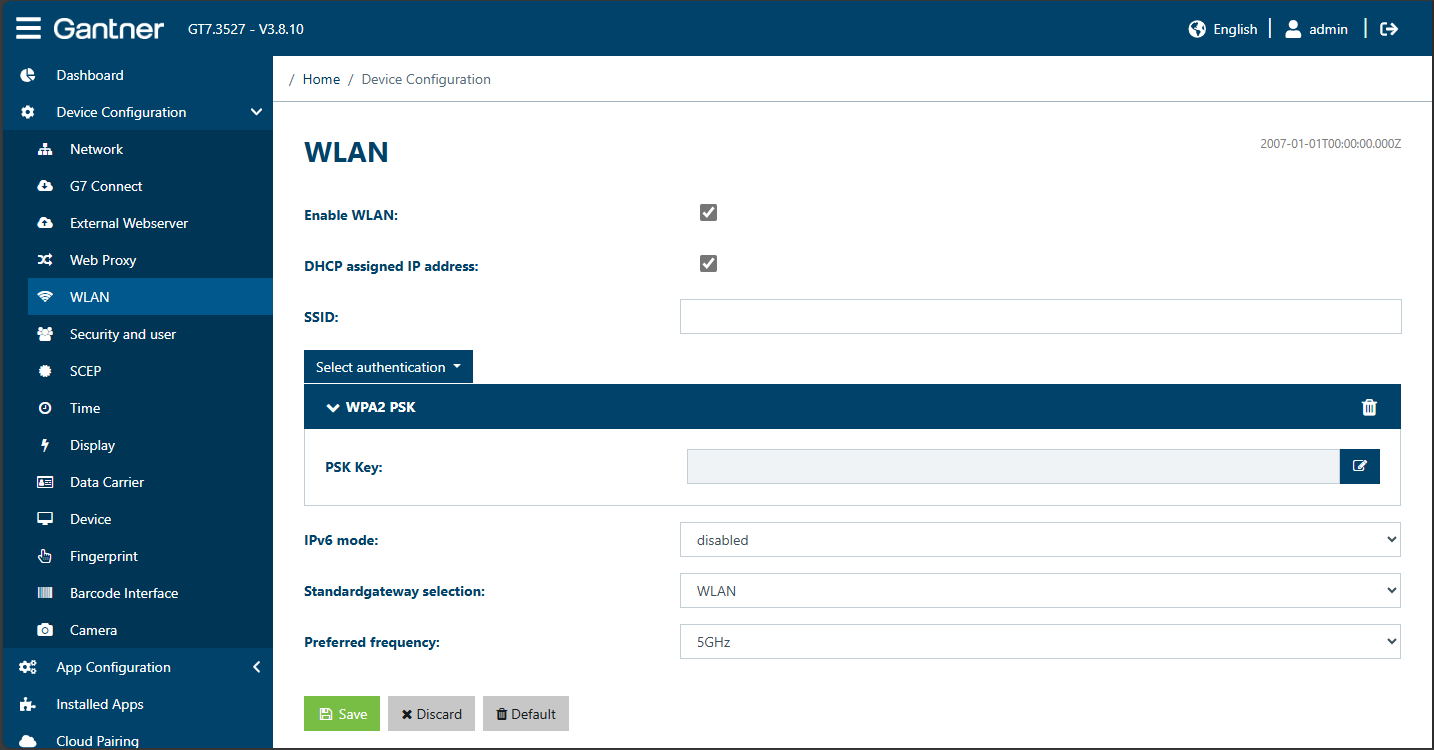
A GT7.3x27 can also communicate using WLAN instead of via the LAN network. When WLAN is enabled, additional options are displayed.
Enable WLAN: With this option, WLAN can be activated or deactivated.
DHCP assigned IP address: Select the option to obtain an IP address automatically from a DHCP server. Alternatively, disable this option and enter the static IP address data into the Static IPv4 configuration area.
SSID: Enter the name of the WLAN network here.
Authentication: Select WPA PSK here for the WLAN encryption method. You can then enter the PSK Key (password for the wireless network).
IPv6 mode: Here you can select whether to enable or disable the WLAN connection for IPv6 mode. If you enable WLAN, select one of the following options from the menu to define how the IPv6 addresses will be assigned.
DHCP assigned IP address: The device address is automatically assigned by a DHCP server.
Static configuration: Select this option and enter the network settings into the Static IPv6 section to assign a static address to the device.
Stateless address autoconfiguration: Stateless address autoconfiguration is the process that IPv6 nodes (hosts or routers) use to automatically configure IPv6 addresses for interfaces.
Standard gateway selection: Select the type of connection (LAN Ethernet or WLAN) to use for communication from the menu. When selecting Ethernet or WLAN, only the selected connection type will be used with preference.
Preferred frequency: Select the desired frequency for WLAN communication (2.4 or 5 GHz).