4.10. Backup and restore data
 |
On the Backup page, it is possible to make a backup of all data in the eLoxx One database or to load a previous backup and thus restore the old data.
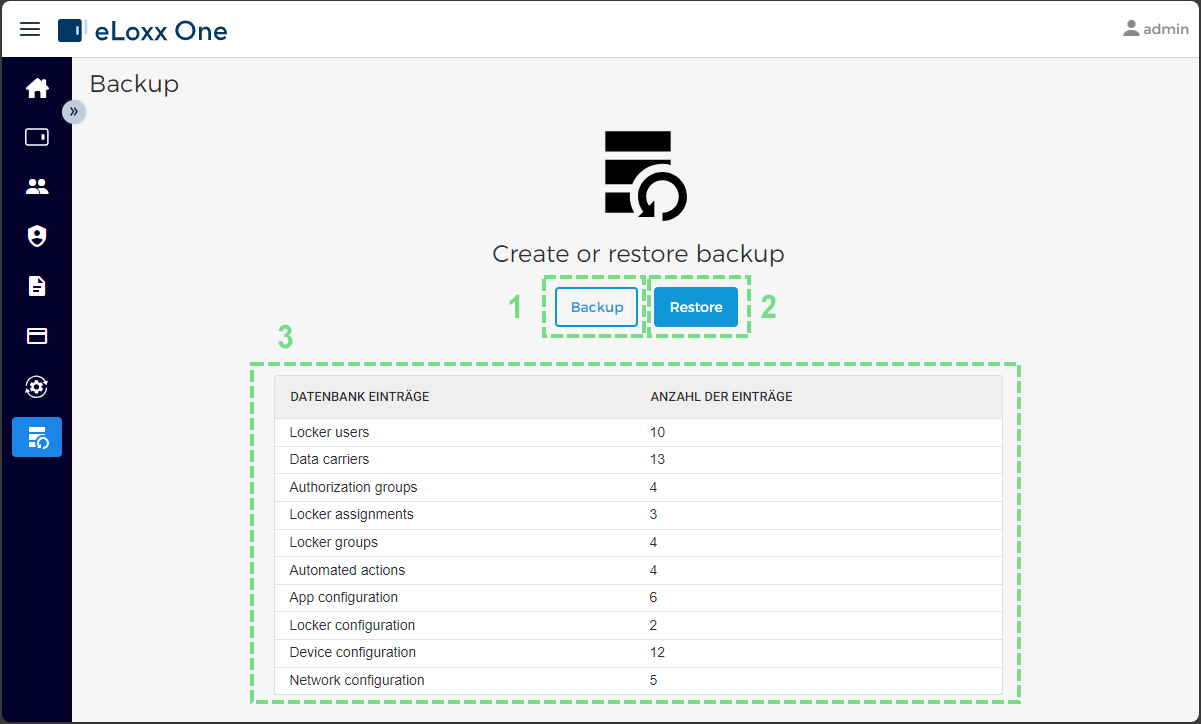
Here the following elements are shown.
Backup
This will automatically start the backup of the data base. A ZIP file with the database entries will be downloaded into your standard download folder (see "Backup the eLoxx One database" for more information).
Restore
This will start the restore process of a previsously saved backup. Pressing this button opens the Restore window where you can define the restore process. See Restore eLoxx One database with a previously saved backup for more information on this process.
Record Count
This shows the number of database entries for each data category (number of locker users in eLoxx One, number of locker groups, etc.).