4.2. Interface of eLoxx one
After logging in with a username and password, a system overview is displayed.
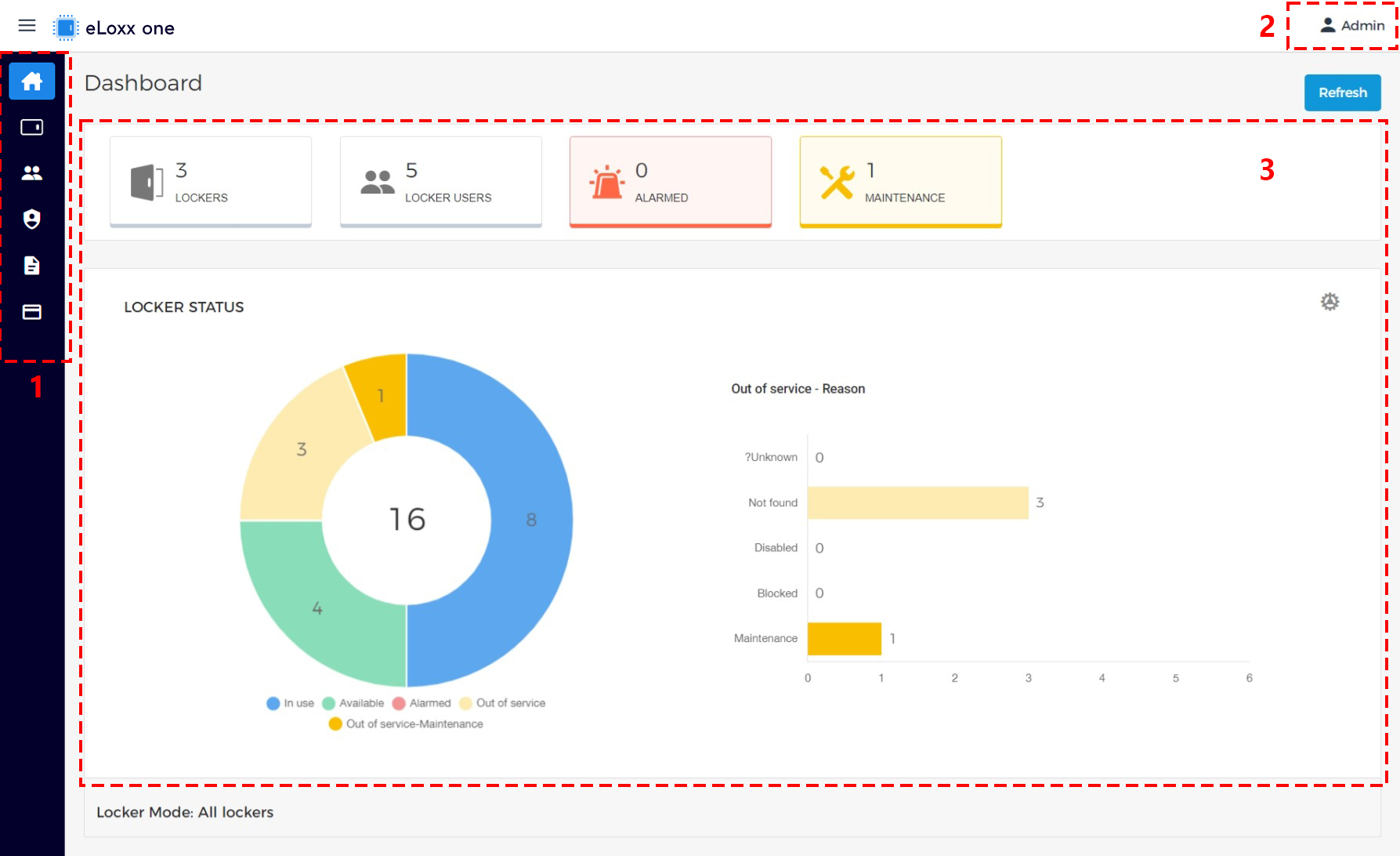
The following areas and functions are available in the main window:
Menu bar:
Select the desired page from the menu.
Dashboard:
This view is displayed after logging in and provides an overview of the locker system (usage, alarms, etc.).
Locker view:
All lockers used in the system, divided into locker groups, are displayed here.
Locker users:
The users of the locker system are managed here.
Authorization groups:
Authorization groups can be used to control the location and number of lockers that members of the authorization group can use.
Logs:
All activity in the locker system, e.g., the locking and unlocking of lockers, etc., is logged. You can evaluate the logged data here.
Master cards:
Here the master cards for the system are displayed for configuration and can be enabled or disabled.
User menu:
The username of the currently logged in user is shown here. Clicking on the name opens the user menu where you can set the display language (“Language”) of eLoxx one, view contact information (“About”) and log out of the application (“Log out”).
Main window:
This area displays different information depending on which page is selected via the menu bar. The pages are described in the following chapters.