5.7. Opening a Locker
You can open a locker remotely using eLoxx one. All locker actions, including the remote opening of lockers, are recorded and available to view on the “Logs” page (see chapter “Logs”).
Locate the locker on the "Locker view" page.
Click on the settings icon of the respective locker and select “Open locker” from the “Actions” menu.
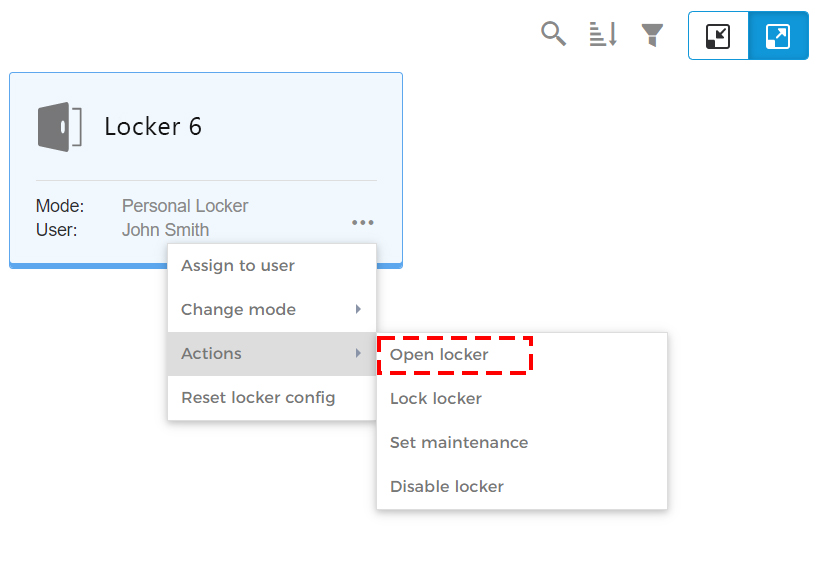
↪ The confirmation window opens.
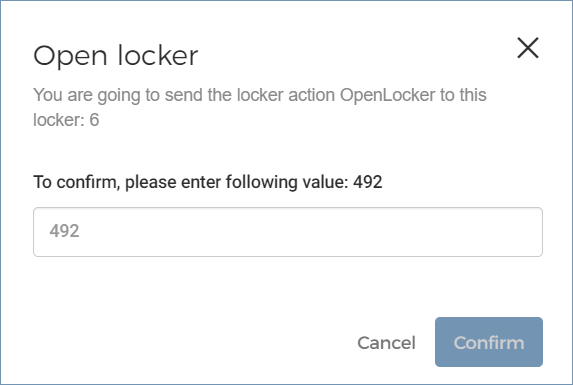
Enter the displayed code number and click on “Confirm” to complete the action.
↪ The locker is opened.
Caution
Before opening, confirm the identity of the user for whom you are opening the locker. The user should be at the locker before the open command is executed as the locker door is immediately unlocked and can be opened by any person after execution.